Drop the advance.
The day sheet writes itself.
Drag a promoter email, an advance PDF or a screenshot onto a show — Load In Suite extracts times, contacts and venue details into a structured day sheet the whole touring team can see and open on mobile and desktop.
Drag-and-drop auto-fill
Drop a promoter email, advance PDF or screenshot onto the show — Load In Suite reads it, extracts the schedule items, contacts and venue details, and writes them straight into the day sheet for you to tidy and confirm.
Type-aware items
Load-in, sound check, doors, support, headline, curfew, load-out, travel — colour-coded and grouped. Travel items get sub-types: flight, train, bus, splitter, ferry.
Per-item visibility
Hide the production-meeting note from the band. Show the band's hospitality slot to the band only. Per-item toggle — everyone or selected users — so the crew sees what they need to see.
Reusable templates
For tours where every day has the same shape, save a template once and apply it across a single show or a whole date range. Tour-scoped so a festival run and a theatre tour each have their own pattern.
Mobile guest list
Add a guest from your phone in seconds — the singer's mum, the management plus-one, the long lost friend who inevitably will not show. All synced in seconds.
Export & share on mobile
One tap to export the day sheet as a PDF, then send it from your phone's share sheet — WhatsApp it to the support, AirDrop it to the crew, email it to the venue. No "you'll have to find a laptop" moments.
Or send a live link instead: a single URL that always reflects the latest version of the day sheet. Pick which sections the recipient sees, lock it to today's version if you want, or set an expiry. Edit anything later and the link updates itself — no resending PDFs when the curfew shifts.
See it in action
A closer look at the parts that save the most time across a tour.
From advance to day sheet in seconds
Drag a promoter email, an advance PDF or a venue screenshot onto a show. Load In Suite reads load-in, sound check, doors, set times, curfew, venue contacts and address — and writes them into the day sheet as structured items.
Click a show, edit the day
Add or tweak items inline — title, start, end, type. Everything sorts itself by date offset then start time, so a 6am lobby call the morning of, a 14:00 sound check and a 23:00 load-out all sit exactly where they should.
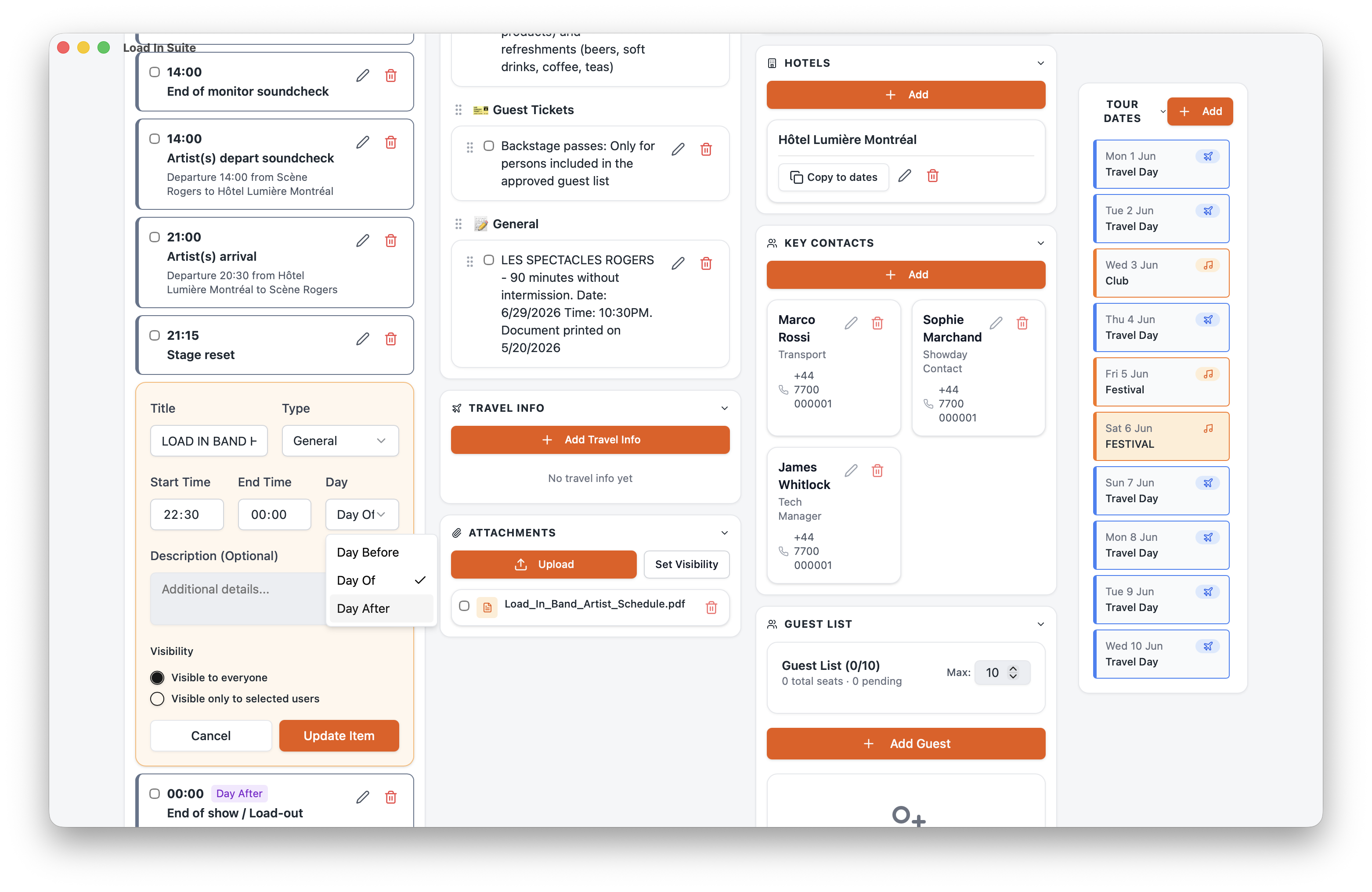
Right people, right info
Every item has an "everyone" or "selected users" visibility toggle, so production-meeting items, artist-only hospitality and tour-manager scratchpad notes can all live on the same day sheet without leaking.
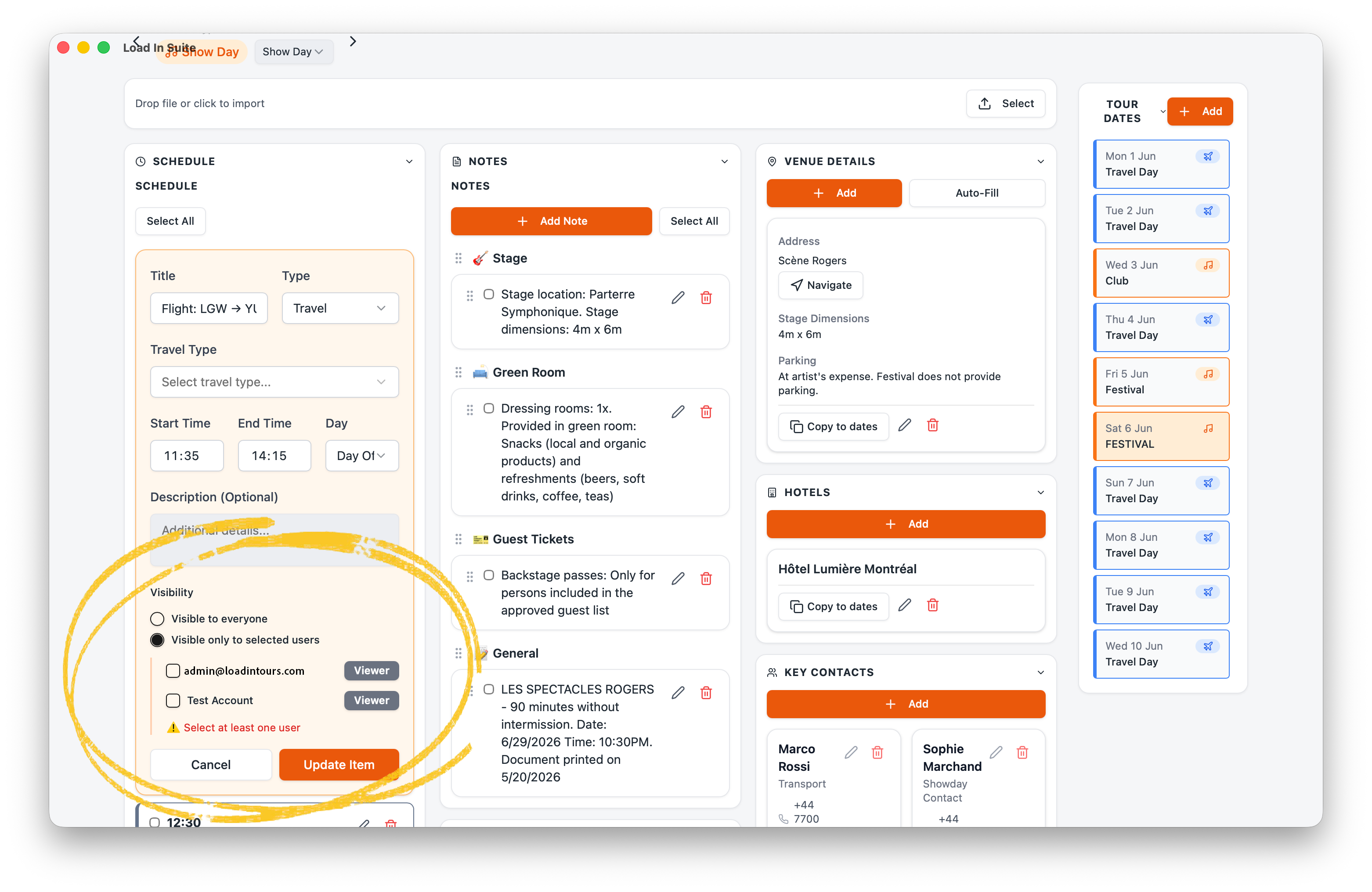
One tap, the day's whole shape
A quick-glance view — tap  from any day in the Load In Module and the crew sees today's run order, times and venue contacts. Offline-first so it works when the venue Wi-Fi doesn't.
How it works
Plot the tour
Create the tour and add the shows — date, venue, city. Each show gets its own day sheet automatically.
Drop the advance in
Drag the promoter's PDF, email or screenshot onto a show — Load In Suite extracts the schedule, contacts and venue details into a structured day sheet. Or apply a saved template if the day repeats.
Share
Set per-item visibility, then invite tour members — they see the day sheet in real time.
Crew opens the mobile app
Day-of, every crew member opens the app and sees the day in their pocket. Offline-friendly so signal isn't an excuse.
Build your first day sheet in minutes
The all-in-one touring app — built on the road, for the road.
Get started